The pedal understands MIDI the way your controller
speaks: pick a MIDI map (Stock, Chocolate, Generic or your own Custom map), give each preset up to four
MIDI expression controls EXP A–D that move the knobs you choose, and keep one tempo for every preset if you like.
The built-in maps are the same as on the Smart Box (Freeze CC 114, DRV Vol CC 115): see Same maps as the Smart Box. With Drum Sync the metronome
follows your tempo.
The built-in Stock, Generic and Chocolate maps are the same on the
Pocket Master, the Smart Box and the Amphonix 2 (the same numbers, the same behaviour): a controller set up for one pedal
works on the other.
Freeze is CC 114 (≥ 64 on, < 64 off). CC 69 sets the tempo (with CC 68).
DRV Vol is CC 115. CC 11 (expression on the Smart Box) does nothing on the Pocket Master.
Also in Stock: CC 68 / 69 set the tempo (the Smart Box scheme), CC 70 = tap, CC 71 / 72
= STOMP FS1 / FS2, CC 112 = PRESET / STOMP mode by value, CC 113 = SCENE mode. Generic has CC 68 / 69,
112, 113 and 115 too.
One press rule: every "press" function (tap, STOMP, bank / preset ±, looper rec /
clear, …) acts only when the value is ≥ 64. A momentary switch that sends 127 on press and 0 on release
acts once, not twice.
Custom maps follow the same rule for "any value" rows: bank / preset ± and looper rec / clear act only
at ≥ 64. A row with its own Value (< 64, = 0, …) acts whenever that value arrives, for every function (e.g.
CC 3 = 0 → Preset −). A Custom map can hold the Smart Box's tempo-set rows (they work here) and expression rows (they
do nothing here).
The shared numbers on the Pocket Master
Message
What it does
Stock
CC 114
Freeze (≥ 64 on, < 64 off)
CC 115
DRV Vol
CC 11
nothing (Smart Box: expression)
CC 68
tempo: range for CC 69 (0 → 40..127, 1 → 128..255, 2 → 256..260; other values: CC 69 ignored)
CC 69
tempo: BPM value (with CC 68 = 0: 40..127 BPM)
CC 70
tap (≥ 64)
CC 71 / 72
STOMP FS1 / FS2 toggle (≥ 64)
CC 112
footswitch mode by value: < 64 PRESET, ≥ 64 STOMP
CC 113
SCENE mode (≥ 64; presets with scenes)
CC 22 / 23 (bank − / +)
≥ 64 only
CC 24 / 25 (preset − / +)
≥ 64 only
CC 60 (looper rec)
≥ 64 only
CC 64 (looper clear)
≥ 64 only
Generic
CC 115
DRV Vol
CC 11
nothing
CC 68 / 69
tempo (as Stock)
CC 112 / 113
footswitch mode by value / SCENE mode (as Stock)
PC 109
Freeze toggle
Chocolate
PC 108
Freeze toggle
Custom
bank / preset ± rows, looper rec / clear rows
≥ 64 only
Check your controller / Custom maps: Freeze is on CC 114 and DRV Vol on CC 115 (Stock and
Generic). CC 22–25 / 60 / 64 act only at ≥ 64: a controller button that sends 0 and 127 on alternate presses acts
only on every second press. Give it a fixed value 127, or use a Custom map with a row for each value (e.g.
CC 3 = 127 → Preset +, CC 3 = 0 → Preset −).
// 01
Choose your map
A MIDI map decides which message does what: "CC 26 = tap" or "PC 105 = tap". Every
map has the same features and options; only the messages differ. The map is global (the same for every
preset) and stays after a power cycle.
Stockdefault
Pocket Control, DAWs, everybody who uses the pedal's own CCs.
The pedal's own CC map (CC 1 preset, CC 22–25, CC 26 tap, CC 43–51 blocks, looper,
drum, STOMP, scenes …), plus CFW functions on CCs the stock firmware leaves unused. The same map as on the Smart Box:
Freeze on CC 114, DRV Vol on CC 115, CC 68 / 69 (tempo), 70 (tap), 71 / 72 (STOMP), 112 / 113 (footswitch
mode); press functions act on values ≥ 64 (details).
Program Changes and notes are ignored, as always. Works as is with the Pocket Control factory banks
"Pocket Master 1–4": nothing to load on the Pocket Control.
Chocolate
M-Vave Chocolate v1 in mode B, Chocolate Plus in mode 1.
Plug and play for controllers that only send Program Changes: PC 0 = P01 …
PC 99 = F50, and the 28 numbers PC 100–127 run the most useful functions (bank / preset ±, tap, looper,
freeze, tuner, tap + note, scenes, STOMP, EXP A–D). Every CC is ignored, so other modes cannot
trigger anything by mistake. v1 mode A works too (P01–P32 only).
Generic
iLoopino, most PC-based controllers, Chocolate Plus in mode 5 (our recipe).
The same PC layout one number higher, PC 1 = P01 (the PC number is the preset
number on the screen), plus the Stock CCs only for the features that have no PC (volumes, knobs, EXP
A–D, blocks, looper window and volumes, drum, Global EQ; also the tempo CC 68 / 69 and the
footswitch mode CC 112 / 113). Level CCs use the full 0–127 travel. CC 1 and CC 22–26 do nothing
here: for CC-based setups use Stock.
Custom
Anything else: your own messages.
Your own table, made in the web app: start from a copy of Stock, Chocolate or Generic
(or empty), move any feature to any CC, PC or note, save it to the pedal. Up to 64 rows. See the Custom map editor.
Which map is mine?
I have a Sonicake Pocket Control, a DAW, or I already use the pedal's own CCs→ Stock (nothing to do)
I have an M-Vave Chocolate v1 (or a Chocolate Plus and want it quick)→ Chocolate, controller in mode B (Plus: mode 1)
My controller sends Program Changes 1, 2, 3 … for presets 1, 2, 3 (iLoopino and others)→ Generic
I have a Chocolate Plus and want everything (long presses, groups)→ Generic + our mode 5 recipe
None of these fits, or I want a feature on another number→ Custom
How to switch the map
On the pedal: Settings → MIDI → turn to page 2 → MIDI MAP: STOCK ·
CUSTOM · GENERIC · CHOCO (see the MIDI tab).
In the web app: Settings → MIDI → click one of the four map cards. Under
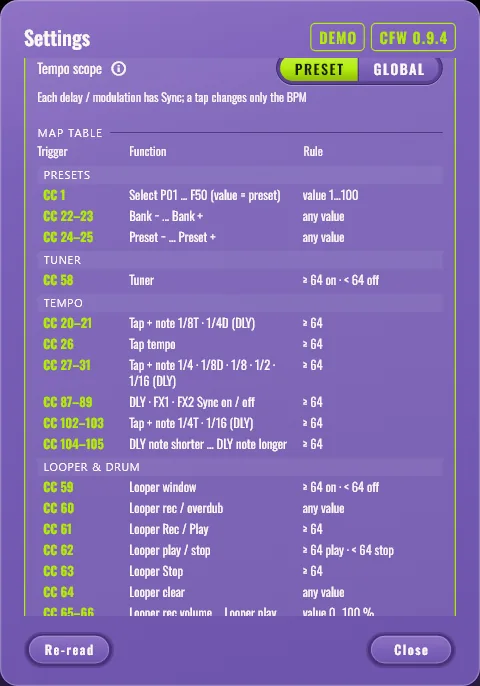
them you see the table of the active map, grouped by feature, and the MIDI monitor.
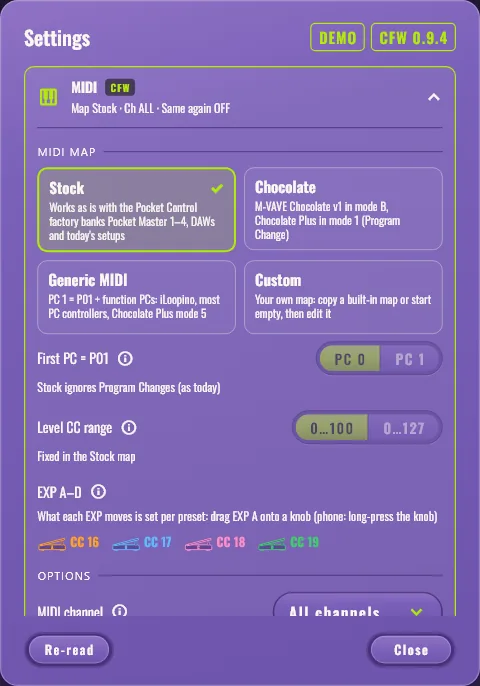
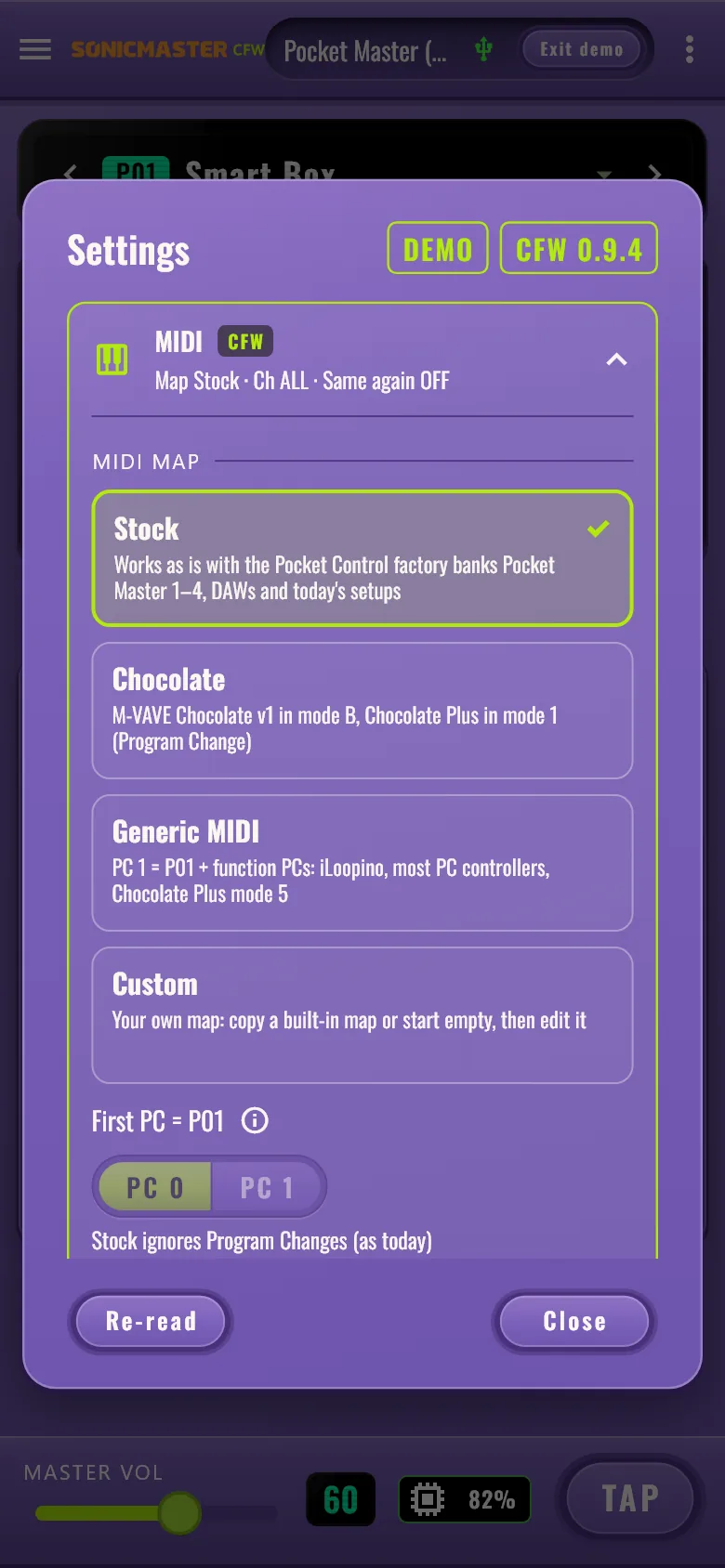
Settings → MIDI in the web app: map cards, options and the
triggers of EXP A–D (demo).The same on a phone.
Every message of every map, side by side: the feature
matrix. Step-by-step setups for real controllers: the recipes.
// 02
Map options and fixed rules
Option
Stock
Chocolate
Generic
Custom
First PC = P01
— (PCs ignored)
PC 0
PC 1
0 or 1
Level CC range
0–100
— (no values)
0–127
either
MIDI CH
the pedal's MIDI CH setting (ALL or 1–16)
MIDI CH, or a channel per row
First PC = P01: MIDI counts programs from 0, many controllers show them from 1. The
Chocolate sends PC 0 for its first switch, the iLoopino PC 1 for preset 1. Fixed in the built-in maps, your
choice in Custom.
Level CC range (volumes, knob roles, EXP A–D): 0–100 = the Pocket Control scale, values
above 100 are ignored (EXP A–D treat them as the maximum), so the Pocket Control's expression pedal
(0–100) feels exactly as on the stock firmware; 0–127 = the full travel of a standard expression pedal, stretched to
0–100 %.
MIDI CH (Settings → MIDI) works in every map: with a channel set,
messages on other channels are ignored. See MIDI channel in the manual.
Rules that are always on
Tuner exit: while the tuner is open, any preset selection (PC, CC 1, bank / preset ±),
also of the preset that is already on, closes the tuner and loads that preset.
CC 120–127 are always ignored (MIDI "channel mode" messages such as All notes off:
some devices send them by themselves).
Stock passes every CC it knows to the pedal exactly as the stock firmware does and ignores Program
Changes and notes. Chocolate, Generic and Custom act only on the messages in their table: everything
else is dropped.
Continuous values (an expression pedal, a fader) are applied at most once every 10 ms
per target, without clicks, and they do not mark the preset as changed; the web app shows the last value
about 0.3 s after you stop.
A factory reset sets the map back to Stock; your Custom map stays stored (like your
IRs).
// 03
Extra controls in every map
Besides everything the pedal already did by MIDI, the CFW adds these features. The numbers below are
the Stock ones; the other maps are in the matrix.
Feature
Stock
How it works
Knob roles
CC 8–10 · 12–15 · 115
8 IR Vol · 9 EQ Vol · 10 DRV Gain · 115 DRV Vol · 12 AMP Gain · 13 AMP Vol · 14 DLY Mix · 15 RVB Mix, on whatever model is loaded in that block (a model without that knob ignores it). CC 11 is the Smart Box expression CC: it does nothing on the Pocket Master
EXP A–D
CC 16–19
move the knob each preset assigned to them: see EXP A–D
Tap + note
CC 27–31 · 20 · 21 · 102 · 103
value ≥ 64: sets a note value (a second press within 2 s also counts as a tap). TEMPO PRESET = the current preset's delay note, only with its Sync ON; GLOBAL = one note for every synced delay (¼ · ⅛D · ⅛ · ½ · 1/16 · ⅛T · ¼D · ¼T · 1/16): see Tap, Sync and note values
Sync on / off
CC 87 · 88 · 89
Value ≥ 64: switches Sync of the DLY / FX1 / FX2 block (on = 1/4, off = 500 ms on a stock delay, the model's default time on a CFW delay, 0.50 Hz on a modulation). Stock and Generic
Delay note step
CC 104 · 105
Value ≥ 64: the delay note one step shorter / longer, only with Sync ON (with TEMPO GLOBAL: the global note). Stock and Generic
Freeze
CC 114
≥ 64 on, < 64 off: a momentary switch holds the tail while pressed, a latching switch turns it on / off. Acts on the Freeze reverb.
Tempo set (BPM)
CC 68 · 69
The Smart Box scheme: CC 68 = range (0 → CC 69 = 40..127 BPM, 1 → 128..255, 2 → 256..260; other values: CC 69 ignored; 0 at power-on), CC 69 = the BPM in that range. Like a tempo typed in the web app: TEMPO PRESET = this preset's tempo (*), GLOBAL = the global tempo. A BPM outside 40..260 is ignored. Stock and Generic
Tap, Smart Box number
CC 70
≥ 64: one tap, like CC 26
STOMP FS1 / FS2, Smart Box numbers
CC 71 · 72
≥ 64: toggles the STOMP group, like CC 80 / 81
Looper rec / play · stop
CC 61 · 63
≥ 64: the two switches of the looper screen. Rec / play: empty → rec, rec → play, play → overdub, overdub → play · stop: stops play / rec / overdub. CC 60 / 62 / 64 (rec / overdub, play / stop, clear) work too (CC 60 and CC 64 only at ≥ 64)
Global EQ
CC 86
≥ 64 on, < 64 off
Footswitch mode
CC 111 · 112 · 113
CC 111 ≥ 64: the pedal's own footswitches step PRESET → STOMP → SCENE (SCENE only when the preset has scenes). CC 112 sets the mode by value (< 64 PRESET, ≥ 64 STOMP), CC 113 ≥ 64 = SCENE (presets with scenes)
Program Change
ignored in Stock
selects presets and runs functions in Chocolate, Generic and Custom
// 04
EXP A–D (MIDI expression pedals)
Four virtual expression controls your controller can drive, EXP A, B, C and D. Each preset decides what
each EXP moves: the gain in your lead sound, the delay mix in the ambient one. An expression pedal moves the knob
smoothly between a minimum and a maximum; a footswitch flips it between the two.
Which message moves which EXP
Map
A
B
C
D
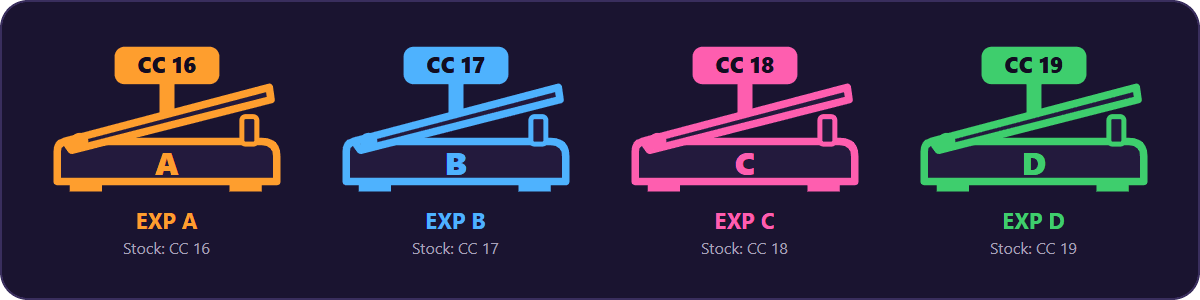
Stock
CC 16
CC 17
CC 18
CC 19
Generic
CC 16 / PC 125
CC 17 / PC 126
CC 18 / PC 127
CC 19
Chocolate
PC 124
PC 125
PC 126
PC 127
Custom
any CC, PC or note you choose
A CC value moves the EXP (continuous mode) or presses it (≥ 64 = pressed,
< 64 = released); a PC is always a press. Generic has no free PC left for EXP D: use CC 19 = 127. The web
app shows the triggers of the active map under the map cards and on each EXP.
Assign an EXP to a knob
Open the preset in the web app and the block you want (for example DLY). Under its
knobs you see the dock EXP A–D with the four EXP chips and their triggers.
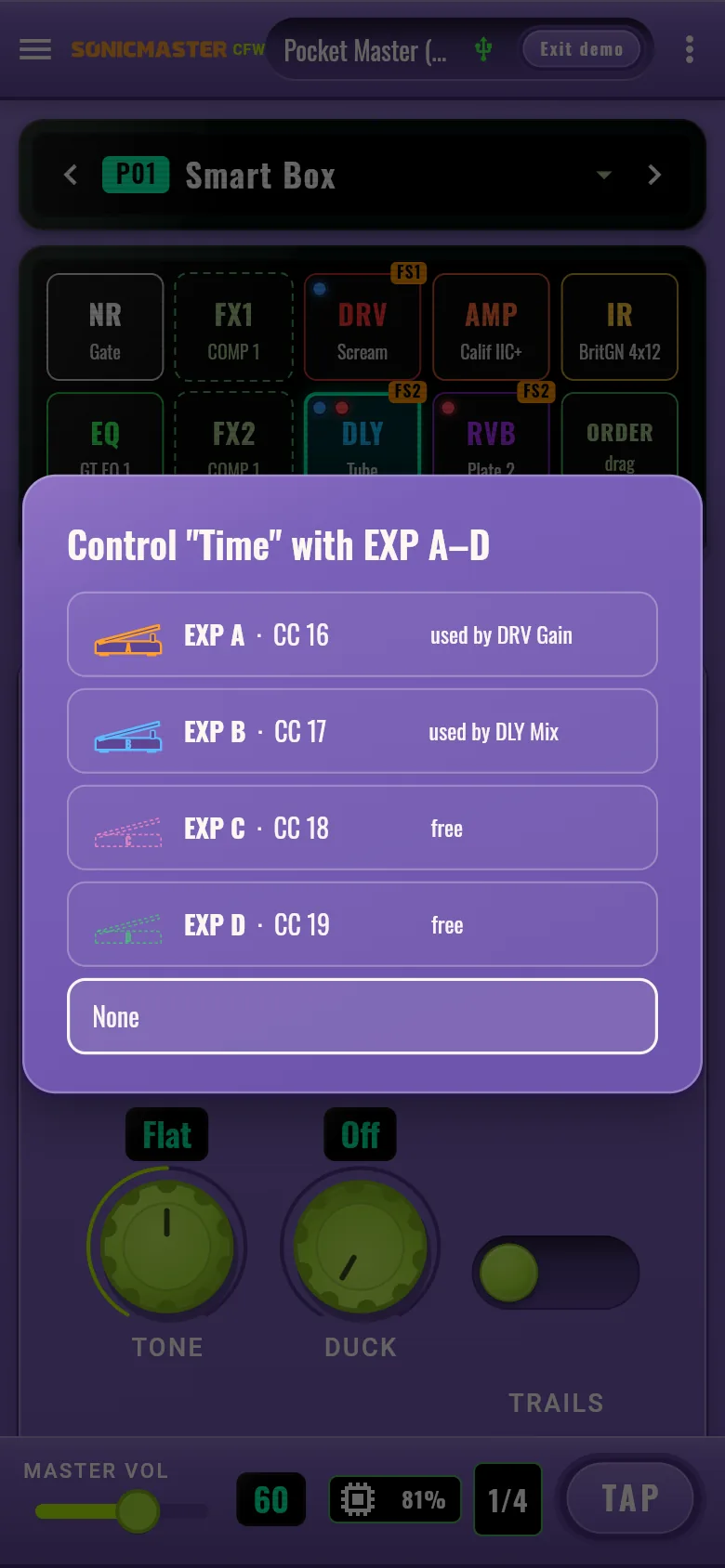
Computer / tablet: drag EXP A (or B, C, D) onto a knob. Phone: long-press the knob (hold the finger still for about a second; on a computer: right-click) and pick the EXP in the sheet "Control … with EXP A–D".
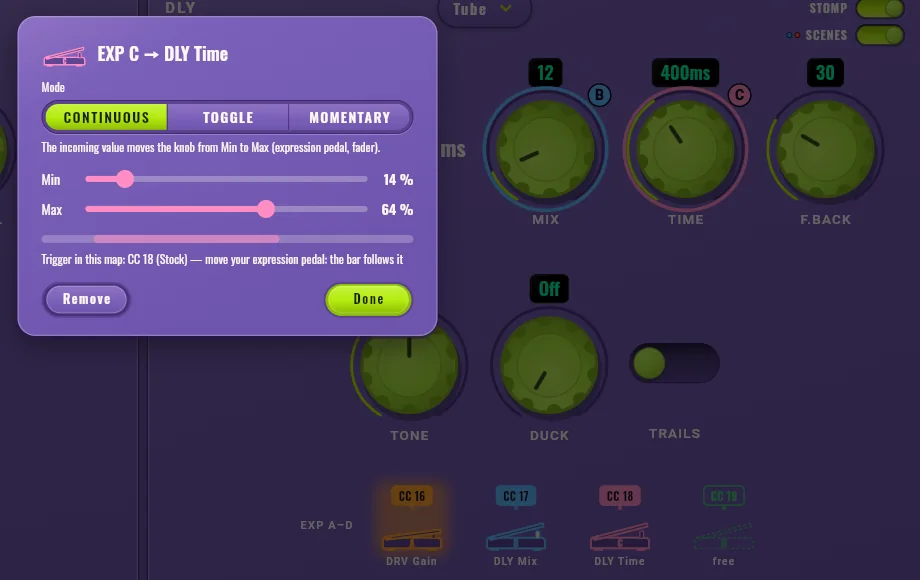
Set it up in the window that opens: Mode, Min, Max (0–100 % of
the knob's travel; min above max = inverted). Move your real expression pedal: the bar follows it live, so you see that the
right message arrives. Done.
Save the preset. The assignments are stored with the preset, like its scenes and
STOMP groups, and come back every time you load it.
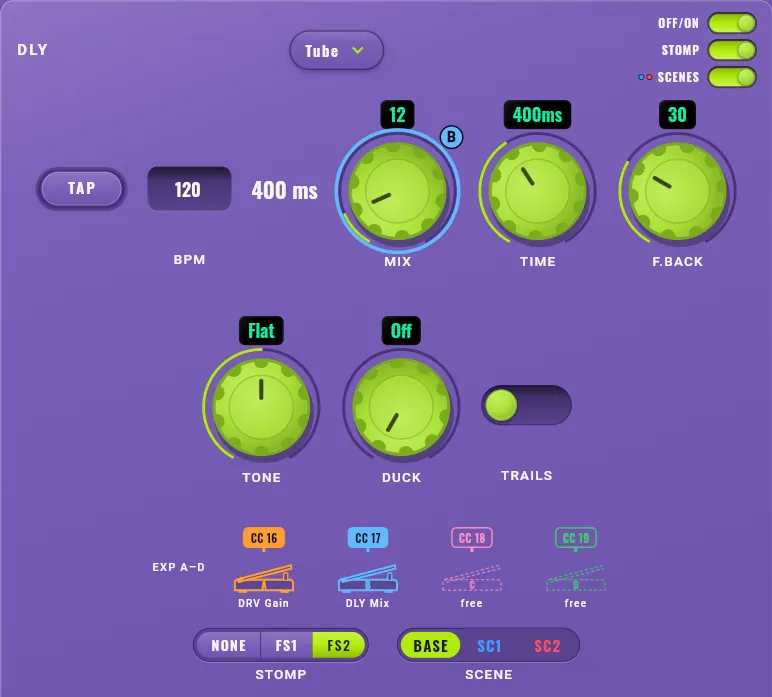
The dock under the knobs: A moves the DRV Gain, B the DLY Mix (blue ring
and badge "B"), C and D are free (dashed).The EXP window: mode, Min, Max, the live bar and the trigger in the
active map.
On a phone: long-press a knob, pick an EXP.
The three modes
Continuous: the value moves the knob from Min to Max. For an expression pedal or a
fader (Pocket Control EXP, Chocolate Plus EXP, a DAW).
Toggle: each press flips the knob between Min and Max (delay mix 0 ↔ 35 %). For a
footswitch; a PC always works like this.
Momentary: Max while the switch is held, Min when you let go (a CC switch that
sends 127 on press and 0 on release).
C-Wah by foot: a wah on your expression pedal
C-Wah (FX1 or FX2, marked SB in the web app) is the Smart Box's Cry Baby-style
wah. Its Range knob is the wah position: 0 = heel (420 Hz, dark), 100 = toe (2.1 kHz, bright). Put an EXP on
Range in Continuous mode, Min 0, Max 100, and your expression pedal is the wah. No special map needed:
it is an ordinary EXP A–D assignment, on whatever CC your map gives that EXP.
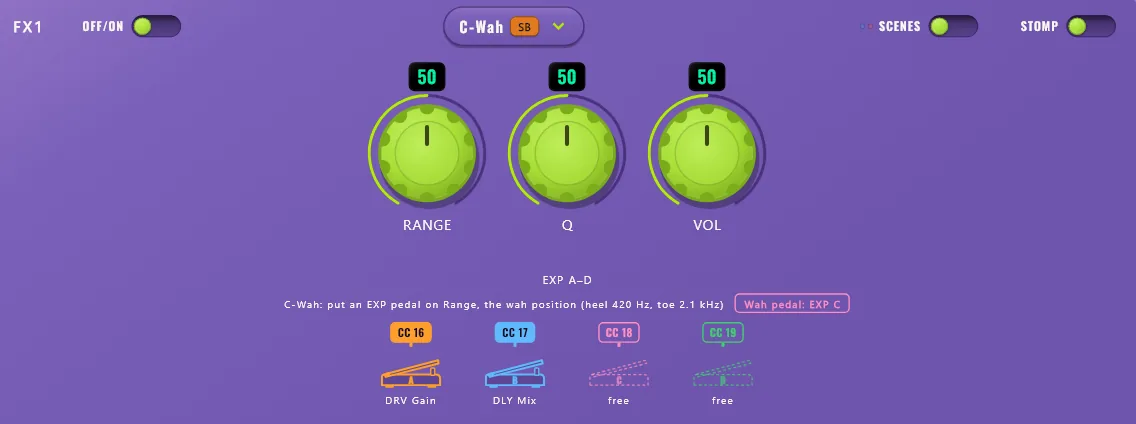
One tap: on C-Wah the dock says "C-Wah: put an EXP pedal on Range …" and offers
the button Wah pedal: EXP x (the first free EXP): Range, Continuous, 0–100 in one go. Then save the
preset. On a phone: long-press Range (the sheet calls it the wah position).
Q sets how vocal the peak is, VOL the level. A narrower Min / Max (for
example 20–90) gives a shorter sweep; Min above Max turns the pedal round. In Toggle mode a footswitch
jumps between two fixed positions (a "parked" wah).
Switch the wah on and off with its block: Stock / Generic CC 44 (FX1) or CC
49 (FX2), or a STOMP group. Step by step: the C-Wah recipe.
C-Wah in FX1: the dock offers Wah pedal: EXP C, the first free EXP
(demo).
// 05
Same preset again (SAME AGAIN)
What happens when a MIDI message selects the preset that is already playing (many
controllers send the same number again when you press the switch of the current preset). On the pedal: Settings →
MIDI → SAME AGN (any message that selects a preset counts, not only CC 1). In
the web app: Same preset again.
OFF (default): nothing. The preset is not reloaded, your unsaved changes and the
scene stay.
CYCLE: each press steps BASE → SC1 → SC2 → BASE, skipping empty scenes.
BACK: go back to the previous preset and the scene it was on. Press P15
to jump there, press it again to return. Works with every controller, also the Chocolate (a second press sends
the same PC). If you changed preset in between in another way, BACK does nothing.
A repeat within 0.4 s of a preset change is ignored, and the first selection
after switching on never changes the scene (many controllers send their preset when they start).
// 06
Tap, Sync and note values
TEMPO = PRESET or GLOBAL
What
PRESET
GLOBAL
Which BPM plays
each preset's own BPM
one BPM for every preset
A MIDI “tap + note”
changes the delay note of this preset only
sets one note for every delay with Sync ON, in every preset (also when this preset's delay is Sync OFF)
Preset marked *
yes, after a tap or a note change
no (saving a preset keeps its own BPM and note)
Preset change
unsaved changes are dropped; the next preset plays its saved BPM and notes
the global BPM and note stay
At power-on
every preset plays its saved values
the global BPM and note come back
Back to each preset's own note
—
switch TEMPO to PRESET, a factory reset, or the Custom-map function “back to the preset note”
Two examples
PRESET: preset A has a delay at 1/8D. Tap 100 BPM: the delay plays 1/8D at 100 BPM = 450 ms, and preset A shows *. Change preset without saving: A comes back with its saved values.
GLOBAL: send “tap + 1/4”: every delay with Sync ON, in every preset, plays 1/4. A plain tap at 100 BPM: all of them play 1/4 at 100 BPM = 600 ms. Switch TEMPO to PRESET: each preset plays its own note again.
Press rule: one press of a “tap + note” button changes only the note; a second press within 2 s also taps the tempo.
In GLOBAL the pedal's main screen always shows the tempo as G 120 (the G replaces the note icon) and, while a global note is active, that note on a second line under the BPM (for example 1/8D); without a second line each preset uses its own note. In PRESET the tempo appears for 1.5 s after a tap. In the web app the tempo pill shows G · 1/8D while a global note is active.
Every delay and every modulation with a Rate has its own
Sync switch, as on the Smart Box: with Sync ON its Time / Rate is a note value (1/1 … 1/16) saved with the
preset, and it follows the tempo. A tap (pedal, MIDI or web app) changes only the BPM: synced blocks follow,
blocks with Sync OFF and Slap never move. The same rules on the Pocket Master and the Smart Box
CFW.
The tempo rows of the Stock map in the web app (demo).
Message (Stock)
What it does
CC 26
one tap: only the BPM changes
CC 27 · 28 · 29 · 30 · 31
tap + note 1/4 · 1/8D · 1/8 · 1/2 · 1/16
CC 20 · 21 · 102 · 103
tap + note 1/8T · 1/4D · 1/4T · 1/16
CC 87 · 88 · 89
Sync on / off: DLY · FX1 · FX2
CC 104 · 105
the delay note one step shorter · longer (Sync ON only)
Tap + note (Stock CC above, Generic PC 111–119, Chocolate PC 110–118) and the
note step: with TEMPO = PRESET they change the note of the preset's delay when its Sync is ON
(with Sync OFF, on Slap or without a delay nothing changes; the delay being switched off does not matter). With
TEMPO = GLOBAL they set the global note even when this preset's delay is Sync OFF; it plays on the synced delays
only. See the table above.
Sync on / off and note step are in the Stock and Generic maps (the same CCs on
both pedals) and can go in a Custom map.
A note longer than the delay model allows plays the model's longest time. 1/1, 1/2D and 1/2T have
no tap + note message: set them in the block.
While you tap the tempo stays as it is: the new tempo is applied once, 1 second
after your last tap, so the repeats do not jump at every tap. The tap popup shows the BPM as you tap.
The Smart Box delays and modulations
The CFW adds 9 delays and 12 modulations of the Smart Box (marked
SB in the web app). The 20 with a Sync switch follow the same tempo rules as the stock models:
Crystal Chorus · Whirlcho · Fullchor · Jet · Flanger ST · Flanser · Phaser M · BBD Phaser · Phaser ST · Lofi Vibrato · Vibrato ST
Tap, TEMPO GLOBAL
with Sync ON they follow the BPM, with Sync OFF they keep their ms / Hz
Sync on / off (Stock, Generic)
CC 87 (DLY)
CC 88 (FX1) · CC 89 (FX2)
Tap + note, note step, global note
yes: they set the delay note
— (delay only, as on the stock modulations)
EXP A–D on Time / Rate
Sync ON: the 11 note values · Sync OFF: ms / Hz
C-Wah, the 12th modulation, has no Sync: you play it with an EXP on
Range (C-Wah by foot). The stock firmware does not have these models: there a preset that
uses one plays the block's first model.
// 07
Tempo scope: one tempo per preset, or one for all
Settings → MIDI → TEMPO on the pedal, Tempo scope in the web app.
PRESET (default): each preset loads its own BPM and delay time; a tap
changes the current preset (save it to keep the tempo).
GLOBAL: one tempo for the whole pedal. A tap (pedal, MIDI or web app) changes
it for every preset, and every preset you load plays at that tempo with its own note value. Nothing is
written into the presets and they are not marked as changed. At power-on the last tempo comes back.
With GLOBAL the tap popup shows a G instead of the note (render, Default
theme).
Web app: the BPM field shows the global tempo with a GLOBAL badge (PRESET in TEMPO PRESET); when the preset's own tempo differs, a grey note says so ("preset's own 120 not used"): it is kept and comes back when you switch to PRESET. Typing a tempo sets the global one.
Saving a preset in GLOBAL keeps the preset's own tempo; the global tempo is not
saved into it. So switching back to PRESET gives every preset its own tempo again.
The synced blocks of every preset you load play at the global tempo, and
a delay note set by MIDI is global too (every delay with Sync ON, no *, back at power-on): see Tap, Sync and note values.
// 07 · drum
Drum Sync: the metronome follows your tempo
On the pedal: Settings → MIDI, page 2, DRM SYNC (next to MIDI MAP). In the web app:
Settings → MIDI, the Drum Sync switch (with Tempo scope).
ON = the drum machine / metronome plays the tempo of the preset: it follows the preset
BPM when you change preset, every tap (pedal, MIDI or web app), a tempo set from the web app or by MIDI (CC 68 /
69), and the global tempo with TEMPO = GLOBAL.
With it ON, changing the BPM in the drum window also sets the tempo, and the delays and
modulations with Sync ON follow (TEMPO PRESET: the preset's tempo, the preset shows *; GLOBAL: the global
tempo).
OFF (the default) = the drum keeps its own BPM.
Saved with the settings; a factory reset sets it OFF. Scenes do not change the tempo, so they
do not change the drum either.
The Smart Box has the same switch (the Sync of its drum window): the web app shows one
Drum Sync row for both pedals.
Going back to the stock firmware: the switch is the pedal's own drum-sync
byte, so it stays set. With it ON, the stock firmware keeps only half of it: a BPM change in the drum window also
changes the preset's BPM (the delays follow only at the next preset change). Harmless; switch DRM SYNC OFF before
going back if you prefer.
// 08
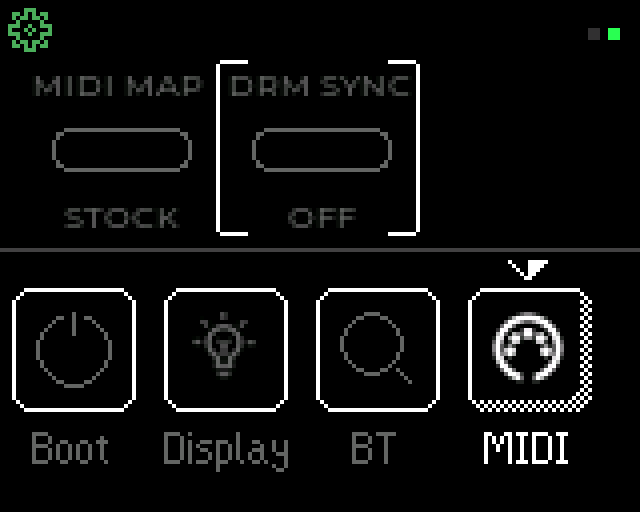
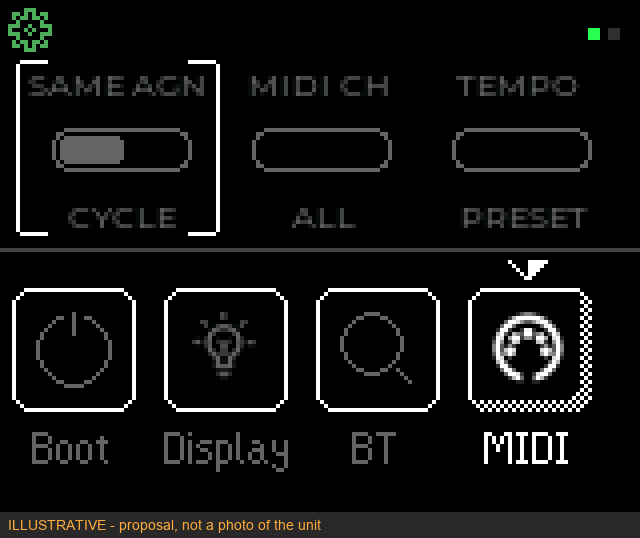
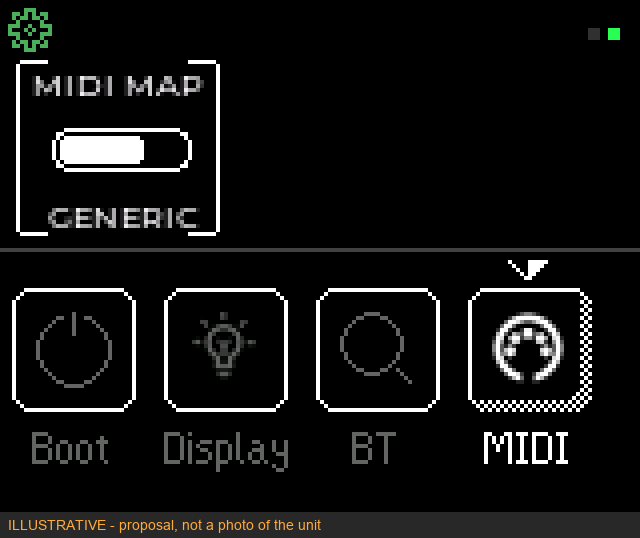
The MIDI tab on the pedal: two pages
Settings → MIDI has five boxes on two pages: SAME AGN,
MIDI CH and TEMPO on page 1, MIDI MAP and DRM SYNC on page 2, with
page dots top right. Turn the encoder to move the frame; after TEMPO it goes on to page 2. Press the encoder to
edit a box (it turns white), turn to change, press again.
Changes are saved by themselves and show up in the web app.
Page 1: SAME AGN (OFF / CYCLE / BACK), MIDI CH (ALL / 1–16) and
TEMPO (PRESET / GLOBAL).Page 2: MIDI MAP (STOCK / CUSTOM /
GENERIC / CHOCO = Chocolate) and DRM SYNC (Drum Sync). Illustrations, Default theme.
// 09
MIDI monitor: see what your controller sends
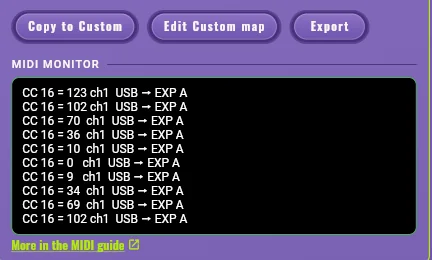
Web app → Settings → MIDI → MIDI monitor: the last 16 messages the pedal received,
newest on top, and what each one did. There is no "MIDI learn": press a switch or move a pedal and read the line.
The monitor under the map table (demo).
The line says
It means
CC 16 = 69 ch1 USB
the message, its MIDI channel and how it came in (USB cable or BLE = Bluetooth)
→ EXP A, → Select P03
the feature it triggered in the active map
as before (stock CC)
Stock map: a CC the pedal always knew, handled as on the stock firmware
not in this map · dropped
nothing in the active map uses this message: check the number, or pick another map
channel-filtered (MIDI CH)
it came on another channel than the pedal's MIDI CH
… · duplicate (ignored)
a repeat the pedal ignored on purpose (for example a preset selection within 0.4 s)
ignored on purpose
a message the map swallows (the Chocolate's bank buttons, PC 0 in Generic, CC 120–127)
Grey lines did nothing, bright lines did something. The monitor reads the pedal
only while it is shown.
// 10
Explained simply
Do I have to change anything after installing the CFW?
No. The map starts on Stock: the pedal's own CCs work as on the stock firmware (bank / preset ± and looper rec / clear act on values ≥ 64 only), and the CFW functions use CCs the stock firmware leaves unused.
Why is the Chocolate column different?
The Chocolate sends only "presses" (128 Program Changes) and never a value: 100 numbers go to the presets, 28 to the most useful functions. So continuous features (volumes, knob roles, EXP A–D as a "fader") cannot work from it, and a few on/off features (single blocks, looper window, drum, Pre/Post, Global EQ, footswitch mode) did not fit. Want one? Copy the Chocolate map to Custom and swap a function you do not use (PC 100–127) for it: in Custom PC 0–99 stay reserved for the presets.
Which Chocolate mode should I use?
Chocolate v1: mode B with the Chocolate map (mode A also works, P01–P32 only). Chocolate Plus: mode 1 with the Chocolate map for a quick start, or mode 5 (Advanced Custom 2) with our recipe and the Generic map for groups and long presses. On the Plus, mode 2 is called "Program Change B" but sends CCs: not supported. The other modes: use Custom.
Why can't the Chocolate do "hold to freeze"?
The v1 sends one message when you press and nothing when you let go, so the pedal cannot know how long you held: freeze and EXP A–D work as on / off. The Plus in mode 4 (Advanced Custom 1) has a press / release setting that sends two messages: that makes a momentary EXP possible.
Why does Stock keep 0–100?
The Pocket Control sends its expression pedal as 0–100, and the stock firmware reads it that way. With another scale every Pocket Control would suddenly feel different. Generic uses 0–127 because most other expression pedals go to 127.
Why do some maps start at PC 0 and others at PC 1?
MIDI counts from 0, many controllers show numbers from 1. The Chocolate sends 0 for its first switch, the iLoopino sends 1 for preset 1. Each map has a "first PC = P01" option, so nobody has to do maths.
Why does Generic ignore CC 1, CC 26 and the scene CCs?
Generic gives every feature one message: the ones that have a PC (presets, tap, looper, scenes, STOMP, tuner) use the PC only, and the CCs are kept only for features without a PC. For CC-based controllers, Stock is the map that keeps every CC.
Why is Freeze on CC 114?
The Pocket Master and the Smart Box share the same built-in maps, and CC 69 is the Smart Box tempo CC (with CC 68). CC 114 is free on both pedals (and on the Amphonix 2), so Freeze has the same number everywhere. A CC with on / off values works with momentary and latching switches; a PC has no "off", so by PC (Generic PC 109, Chocolate PC 108) freeze can only be toggled. Generic has no Freeze CC: for hold-to-freeze with a momentary switch use Stock or a Custom map.
Why are only STOMP, scenes and EXP A–D per preset?
Those change song by song. Everything else (the map, MIDI channel, tempo rules) stays the same for all presets, so your controller always does the same thing and you do not set it up 100 times.
Why per-preset EXP A–D instead of fixed knobs?
The same knob means different things on different models. With EXP A–D each preset decides what your expression pedal moves. The global knob roles (AMP Gain, DLY Mix …) are there for quick fixed setups.
What if a knob role or an EXP targets a knob the model doesn't have?
Nothing happens: the message is ignored. Changing the model of a block clears that block's EXP assignments, because the knob now means something else.
Can I control a wah with an expression pedal?
Yes: pick C-Wah in FX1 or FX2 and put an EXP on its Range knob (Continuous, 0–100): heel = 420 Hz, toe = 2.1 kHz. See C-Wah by foot and the recipe. The stock firmware has no manual wah (only touch and auto wah, which move by themselves).
Why is there no "MIDI learn"?
A Bluetooth controller talks to the pedal, not to the app, and learning on the small pedal screen would be fiddly. The monitor shows at once what your controller sends and what it triggers.
What does TEMPO SCOPE = GLOBAL change in practice?
One tempo for the whole pedal: tap once and every preset follows until you tap again. The tempo saved in each preset is kept, not used (greyed out in the app), so PRESET gives every preset its own tempo back.
Can the factory presets use all this?
Factory presets (F01–F50) store STOMP groups, but scenes and EXP A–D assignments need space they do not have. Save the sound as a user preset (P01–P50): those store everything, unless their scenes are very large.
Why is there no TAP DIV setting?
Each delay keeps its own note, saved with the preset, and modulations can follow the tempo too. One global note value could not do that: a slapback and a dotted-eighth lead could not live side by side. The tap + note CCs set the delay note: of the current preset, or of every preset with TEMPO = GLOBAL.
What is not there yet?
NRPN (every knob by a few CCs, mostly for DAWs), MIDI out (the pedal sending its state to the controller's LEDs) and MIDI clock sync are planned for later. A DAW can send the tap CC on every beat instead.