← Pocket Master CFW MIDI guide Ready-made recipes
// midi · recipes
MIDI recipes
Stable · tested on our own unit
Ready-made setups for the controllers our users have. Each recipe says which map to pick on the pedal and what each switch sends. Check every switch once with the MIDI monitor.
Pocket Control, Chocolate, Cube Suite, SONICLINK and iLoopino are products and apps of their makers; we are not affiliated with them. Controller details come from users' captures and the makers' manuals: if your unit behaves differently, tell us.
// 01
Sonicake Pocket Control: Stock map
map: Stock (default)
Nothing to load: the Pocket Control's factory banks "Pocket Master 1–4" speak the Stock map, which keeps every number they use (preset ± CC 24 / 25 and looper rec / clear CC 60 / 64 act on values ≥ 64 only, see the tips below). Pair it once from the pedal (Settings → BT, pick "Pocket Control BLE"): after that it reconnects by itself.
| Bank | A | B | C | D | EXP |
|---|---|---|---|---|---|
| Pocket Master 1 | CC 24 preset − | CC 25 preset + | CC 58 tuner | CC 93 drum play / stop | CC 6 master volume |
| Pocket Master 2 | CC 45 DRV | CC 44 FX1 | CC 49 FX2 | CC 51 RVB | CC 7 preset volume |
| Pocket Master 3 | CC 43 NR | CC 48 EQ | CC 50 DLY | CC 47 IR | CC 7 preset volume |
| Pocket Master 4 | CC 59 looper window | CC 60 looper rec | CC 62 looper play / stop | CC 64 delete loop | CC 66 looper play volume |
The toggle buttons send 0 and 127 on alternate presses; the expression pedal sends 0–100.
Add more in SONICLINK
In the SONICLINK app, edit a bank of your Pocket Control and give a footswitch (or the EXP) a CC from the Stock column of the matrix. Two ideas:
| Bank | A | B | C | D | EXP |
|---|---|---|---|---|---|
| "Tempo & scenes" | CC 26 tap | CC 82 SC1 | CC 83 SC2 | CC 85 BASE | CC 16 EXP A |
| "Stomp & freeze" | CC 80 STOMP FS1 | CC 81 STOMP FS2 | CC 114 Freeze | CC 86 Global EQ | CC 12 AMP Gain |
- On / off features (blocks, Freeze, Global EQ, tuner, looper play) follow a toggle button perfectly: 127 = on, 0 = off.
- Press features (tap, scenes, STOMP, preset / bank ±, looper rec / play, stop and clear, an EXP in toggle mode) act on values of 64 or more: a button that alternates 0 / 127 acts only on every second press. Give those buttons a fixed value 127 if SONICLINK offers it.
- EXP on CC 16 = EXP A: in each preset, drag EXP A onto the knob the expression pedal should move (continuous mode). Its 0–100 range is the full travel in Stock.
// 02
M-Vave Chocolate v1 (mode B) and Chocolate Plus (mode 1): Chocolate map
map: Chocolate
- Put the controller in mode B (Chocolate v1) or mode 1 "Program Change A" (Chocolate Plus) and connect it to the pedal by Bluetooth.
- On the pedal: Settings → MIDI → page 2 → MIDI MAP = CHOCO (or the Chocolate card in the web app).
- Play. Each bank holds 4 Program Changes (switch A–D); the bank buttons only move the bank (their CC 2 / 3 messages are swallowed). Banks 1–25 are the presets, banks 26–32 the functions.
| Bank | A | B | C | D |
|---|---|---|---|---|
| 1 | P01 | P02 | P03 | P04 |
| 2 … 12 | P05 … P48, four per bank | |||
| 13 | P49 | P50 | F01 | F02 |
| 14 … 25 | F03 … F50 | |||
| 26 | bank − | bank + | preset − | preset + |
| 27 | tap | looper rec / play | looper stop | looper clear |
| 28 | freeze on / off | tuner | tap + ¼ | tap + ⅛. |
| 29 | tap + ⅛ | tap + ½ | tap + 1/16 | tap + ⅛T |
| 30 | tap + ¼. | tap + ¼T | tap + 1/16 | SC1 |
| 31 | SC2 | BASE | STOMP FS1 | STOMP FS2 |
| 32 | EXP A | EXP B | EXP C | EXP D |
- Toggle and return: set SAME AGAIN = BACK. Press the switch of a preset to jump there, press it again to go back to the preset (and scene) you came from.
- The v1 sends nothing on release or long press, so Freeze and EXP A–D work as on / off (press = on, press again = off). Volumes and other values are not possible from it.
- v1 mode A (8 banks) reaches P01–P32 only. The tuner closes when you select any preset.
- Chocolate Plus mode 1: banks are switched with E and F; we expect the same 4-per-bank layout (tell us if your Plus counts differently). Want a feature that is not in the table? Make a Custom map from this one.
- Bank 27 is a looper like the pedal's looper screen: B = rec / play (empty → rec → play → overdub → play), C = stop, D = clear.
// 03
Chocolate Plus in mode 5 (Advanced Custom 2): Generic map
map: Generic
Mode 5 gives each of the four switches a short tap and a long press message, in up to 16 groups switched with E and F (set in M-Vave's Cube Suite app). With the Generic map that reaches every feature. Our layout: group 1 for playing, then scenes, looper, EXP A–D; more presets in groups 5–16.
- In Cube Suite pick mode 5, the MIDI channel of the pedal (any, if MIDI CH = ALL) and the number of groups. For every switch enter the short-tap and the long-press message from the table (CC value = 127 unless shown).
- On the pedal: MIDI MAP = GENERIC.
- Press group 1 switch A and look at the MIDI monitor: it must say PC 1 → Select P01. If it says P02, your app counts PCs from 1: enter every PC one lower.
| Switch | Short tap | Long press |
|---|---|---|
| Group 1 · play | ||
| A | PC 1 · P01 | PC 110 · tuner (any preset closes it) |
| B | PC 2 · P02 | PC 105 · tap |
| C | PC 3 · P03 | PC 104 · preset + |
| D | PC 4 · P04 | PC 109 · freeze on / off |
| Group 2 · scenes (snapshots) and STOMP | ||
| A | PC 120 · SC1 | PC 123 · STOMP FS1 |
| B | PC 121 · SC2 | PC 124 · STOMP FS2 |
| C | PC 122 · BASE | PC 105 · tap |
| D | PC 103 · preset − | PC 104 · preset + |
| Group 3 · looper | ||
| A | CC 59 = 127 · looper window | CC 59 = 0 · back to the main screen |
| B | PC 106 · rec / play | PC 108 · clear |
| C | PC 107 · stop | CC 67 = 127 / 0 · Pre / Post (two groups if you need both) |
| D | PC 109 · freeze on / off | PC 110 · tuner (any preset closes it) |
| Group 4 · EXP A–D and tempo | ||
| A | PC 125 · EXP A | PC 111 · tap + ¼ |
| B | PC 126 · EXP B | PC 112 · tap + ⅛. |
| C | PC 127 · EXP C | PC 113 · tap + ⅛ |
| D | CC 19 = 127 · EXP D | CC 111 = 127 · footswitch mode |
| Groups 5–16 · more presets | ||
| A–D | PC 5–8 (P05–P08), next group PC 9–12 … | as group 2 (SC1 · SC2 · BASE · preset +), so every group switches scenes |
- EXP A–D: in each preset drag the EXP onto a knob and choose Toggle (a tap flips min ↔ max). If your Plus has an expression input, set it in Cube Suite to CC 16 = EXP A in Continuous mode (0–127 in Generic).
- Hold features: mode 5 has no press / release messages. Mode 4 (Advanced Custom 1, no groups) has a press / release sub-mode: for example press = CC 17 value 127, release = CC 17 value 0 makes EXP B momentary (assignment mode Momentary). Hold-to-freeze needs a Freeze CC (Stock CC 114), which Generic does not have: use a Custom map (Copy Generic, add CC 114 → Freeze).
- Mode 2 of the Plus ("Program Change B") sends CCs with value 0 and is not supported. Mode 3 (Custom) sends CC toggles whose values we have not checked yet: only if they are 127 / 0 do they work for on / off features (Stock map).
- Group 3 is a looper like the pedal's looper screen: B = rec / play (empty → rec → play → overdub → play), C = stop, hold B = clear.
// 04
iLoopino (João's layout): Generic map
map: Generic
The Generic map was built on João's PC table: the PC number = the preset number on the screen (PC 1 = P01), his PC 101–104 and 110–115 are kept exactly. Pick MIDI MAP = GENERIC and program the controller with these numbers.
| Message | Feature |
|---|---|
| PC 1–100 | P01–P50, F01–F50 (selecting any preset also closes the tuner) |
| PC 101 / 102 | bank − / + (10 presets) |
| PC 103 / 104 | preset − / + |
| PC 105 | tap |
| PC 106 · 107 · 108 | looper rec / play · stop · clear |
| PC 109 | freeze on / off |
| PC 110 | tuner on (off = select any preset) |
| PC 111–115 | tap + ¼ · ⅛. · ⅛ · ½ · 1/16 |
| PC 116–119 | tap + ⅛T · ¼. · ¼T · 1/16 |
| PC 120 · 121 · 122 | scene SC1 · SC2 · BASE |
| PC 123 / 124 | STOMP FS1 / FS2 |
| PC 125 · 126 · 127 | EXP A · B · C (press) |
| CC 6 / 7 | master / preset volume (0–127) |
| CC 8–13 | IR Vol · EQ Vol · DRV Gain · DRV Vol · AMP Gain · AMP Vol |
| CC 14 / 15 | DLY Mix · RVB Mix (CC 14 stays the delay mix; for a wah: C-Wah with an EXP, see C-Wah) |
| CC 16–19 | EXP A–D (value or press) |
| CC 43–51 · 59 · 65–67 · 86 · 92–95 · 111 | blocks, looper window, looper volumes, Pre / Post, Global EQ, drum, footswitch mode (as in Stock) |
- Level CCs use the full 0–127 travel (no dead top on the expression pedal).
- Want the note value to stay when you change preset? Set TEMPO = GLOBAL: one tempo for every preset, back at power-on, and a tap + note sets one note for every delay with Sync ON, until you switch TEMPO back to PRESET.
- PC 0 is ignored. CC 1 and CC 22–26 do nothing in Generic (they have PCs here).
// 05
C-Wah on an expression pedal
map: Stock or Generic
The Smart Box's wah on the Pocket Master: C-Wah (FX1 or FX2) with an EXP on its Range knob. Heel = 420 Hz, toe = 2.1 kHz, the classic Cry Baby-style sweep. You need an expression pedal that sends a CC value: the Pocket Control EXP, an EXP input on the Chocolate Plus, a MIDI expression pedal, a DAW fader.
- In the web app open a user preset (P01–P50: factory presets cannot store EXP assignments), pick C-Wah in FX1 (or FX2; marked SB, after the stock models) and switch the block on.
- In the dock under the knobs tap Wah pedal: EXP x: the first free EXP now moves Range, Continuous, 0–100. (Or drag an EXP onto Range; on a phone, long-press Range.)
- Set your controller's expression pedal to the CC of that EXP (table below) and rock it: the bar in the EXP window and the MIDI monitor follow.
- Save the preset. The wah pedal comes back every time you load it.
| Controller | Expression pedal | Map |
|---|---|---|
| Pocket Control | in SONICLINK give the bank's EXP CC 16 (= EXP A; the factory banks send the volumes CC 6 / 7 / 66 there) | Stock (0–100 = the full sweep) |
| Chocolate Plus | EXP input set in Cube Suite to CC 16 | Generic (mode 5) or Stock |
| Chocolate v1 | no expression pedal: PC 124–127 toggle an EXP between Min and Max (a wah parked in two positions) | Chocolate |
| MIDI expression pedal, DAW | CC 16 · 17 · 18 · 19 = EXP A · B · C · D | Stock 0–100 or Generic 0–127 |
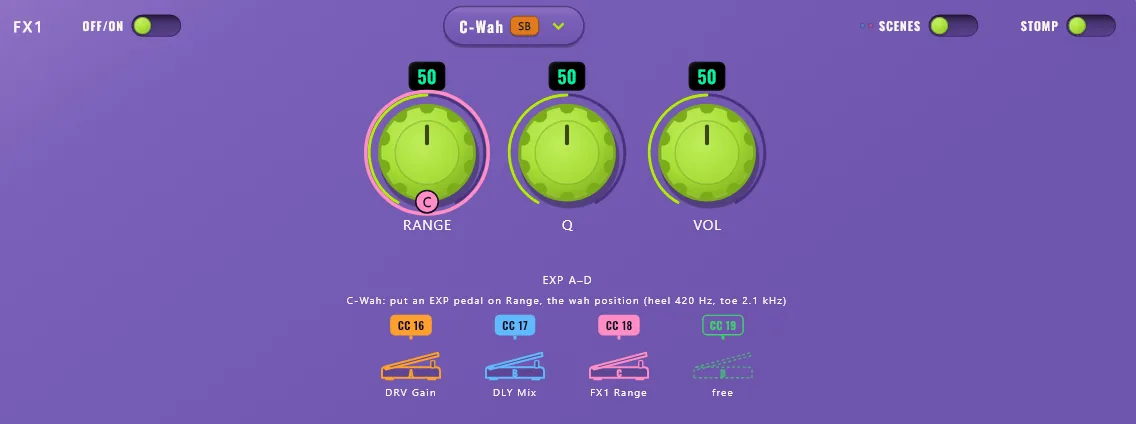
- Wah on / off: put the FX1 block on a footswitch: Stock / Generic CC 44 (FX2: CC 49), or a STOMP group with FX1. A Pocket Control bank for it: A = CC 44 (FX1 on / off), EXP = CC 16.
- Shape the sweep in the EXP window: Min / Max are heel and toe (for example 15–85 for a softer sweep), Min above Max turns the pedal round. Q = how vocal, VOL = the level after the wah.
- Pocket Control (0–100) on Generic reaches only about 80 % of the sweep, because Generic expects 0–127: use Stock, or a Custom map with Level CC range 0–100.
- Changing FX1's model clears its EXP (assign it again). On the stock firmware a preset with C-Wah plays the block's first model.
// 06
Any other controller
- Sends CCs (AirStep, DAW, most programmable boards) → Stock, with the numbers of the Stock column. Momentary switches: value 127 on press.
- Sends PCs from 1 → Generic; PCs from 0 → Chocolate, or Custom with First PC = 0.
- Fixed messages you cannot change → Custom: copy the closest map and move the features to the numbers your controller sends. The MIDI monitor shows them.