← Pocket Master CFW MIDI guide Custom map editor
// midi · custom
Make your own MIDI map
Stable · tested on our own unit
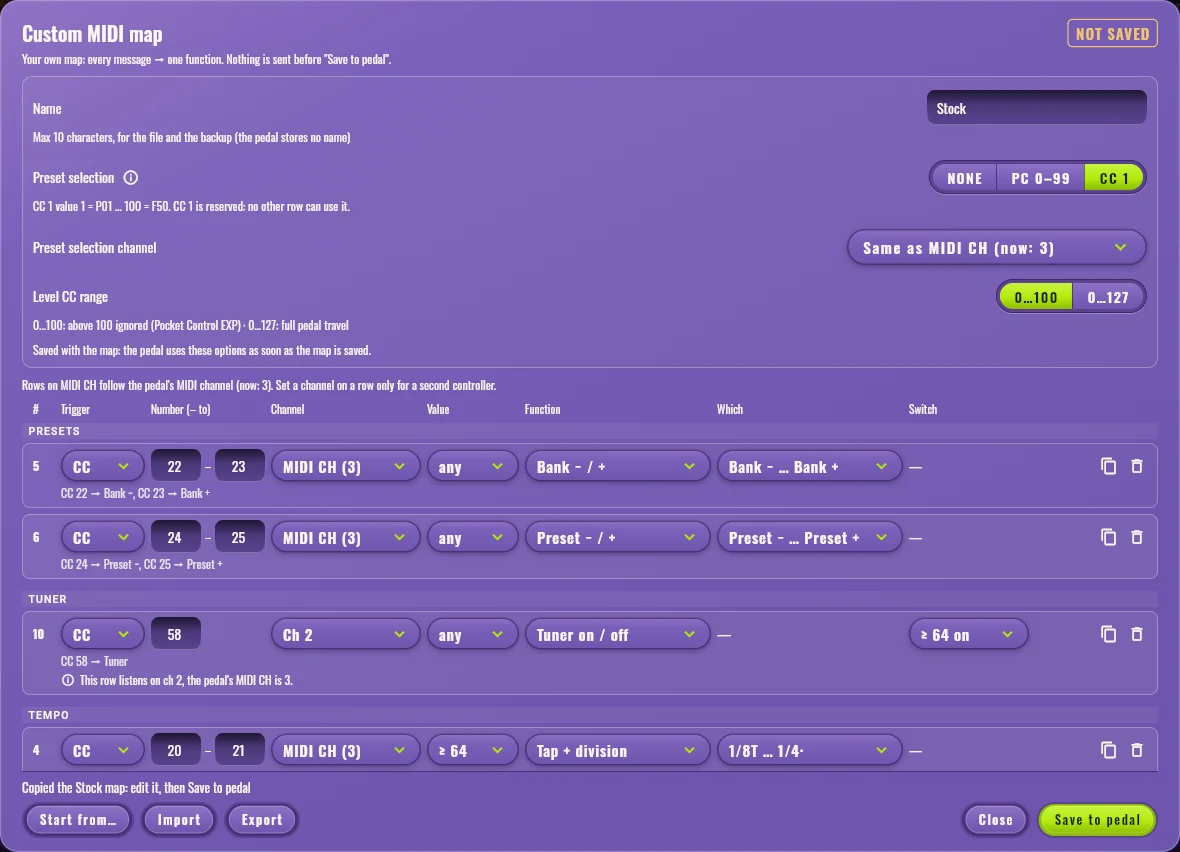
When none of the built-in maps fits your controller, the web app makes a Custom map: every row says "this message → this feature". Start from a copy of a built-in map, change what you need, save it to the pedal and select Custom.
// 01
Open the editor
- Connect the pedal in the web app (or the Windows / Android app) and open Settings → MIDI.
- Under the map table: Copy to Custom copies the map you are looking at (Stock, Chocolate or Generic) into the editor; Edit Custom map opens what the pedal holds now. In the editor, Start from… offers Stock, Chocolate, Generic, Empty or "What the pedal holds now".
- Nothing is sent to the pedal until you press Save to pedal: you can try things out freely.
// 02
Presets: one way only
At the top of the editor, Preset selection decides how this map selects presets, so that a number never means two things:
- PC first–first+99: 100 Program Changes in a row, First PC = P01 0 or 1 (PC 0 = P01 … PC 99 = F50, or PC 1 … PC 100). Those PCs are reserved: no other row can use them. The free PCs are 100–127 (first = 0) or 0 and 101–127 (first = 1).
- CC 1: value 1 = P01 … 100 = F50, as in Stock. CC 1 is reserved.
- None: this map does not select presets by MIDI.
Also at the top: the Preset selection channel ("Same as MIDI CH" = the pedal's MIDI CH, or one channel; rows on MIDI CH follow the pedal's MIDI CH too, a channel on a row is only for a second controller), the Level CC range (0–100 or 0–127) and a Name for the file (the pedal stores no name). These options are saved with the map.
Bank − / + and Preset − / + are normal rows and can go on any free number.
// 03
The rows
Each row is one trigger and one feature. Add row, Duplicate and Delete work on any row; up to 64 rows.
| Field | It means |
|---|---|
| Trigger | CC, PC or Note (Note On = press, Note Off = release) |
| Number · range | one number 0–127, or a range "from – to": then each number is the next choice of the feature (for example PC 110–114 = tap + ¼, ⅛., ⅛, ½, 1/16) |
| Channel | the pedal's MIDI CH, or one channel 1–16 for this row only |
| Value | any value · ≥ 64 · < 64 · exactly n (CC and notes; a PC has no value) |
| Function | the feature: bank / preset ±, tuner, tap, tap + division (tap + note), looper, drum, block on / off, STOMP, scene, volume, knob role, Freeze, EXP A–D, Global EQ, footswitch mode, Sync on / off and delay note (shorter, longer, back to the preset note), tempo set (CC 68 / 69 scheme), or Ignore (swallow the message). The Smart Box's expression rows (a map copied from a Smart Box) are accepted too: they do nothing on the Pocket Master |
| Which | the choice inside the feature: which block, scene, EXP (A–D), note value, knob … For the Looper: rec / play, stop, rec / overdub, play / stop, clear (rec / play and stop are the two switches of the looper screen) |
| Switch | for on / off features on a CC or note: ≥ 64 on · < 64 off (latching switch) or Toggle on each press. A PC always toggles. (The third choice, Momentary, works like ≥ 64 on · < 64 off in this version: see Limits.) |
The rows are grouped like the matrix. On a computer you edit them in place; on a tablet or phone, tap a row to edit it in a sheet (Delete, Duplicate, Done).
// 04
Conflicts
The editor checks the map while you type and puts a badge under each row with a problem. Errors block Save (the pedal would refuse the map); warnings do not.
| Badge | It means | Kind |
|---|---|---|
| reserved | the row uses a preset PC or CC 1 that the preset selection reserves | error |
| preset rule | a row selects a preset: presets are selected only by the choice at the top | error |
| PC value | a Program Change has no value: set the value to "any" | error |
| range too long | the range has more numbers than the feature has choices | error |
| too many | more than 64 rows | error |
| invalid | a number, channel or setting out of range (from a hand-edited file) | error |
| duplicate | two rows react to the same message: the first one wins | warning |
| shadowed | a single number inside a range of another row: single numbers come before ranges | warning |
| CC 120–127 | channel mode messages never reach the map | warning |
// 05
Save and use it
- Save to pedal: the app sends the map in small pieces with a progress bar, the pedal checks it and stores it safely (two copies: a power cut during the save leaves the old map or the new one, never a broken one), then the app reads it back and compares.
- If the pedal refuses it, the message says why in plain words (for example "an entry is out of range or breaks the preset rule"); nothing changes on the pedal.
- Saving does not switch the map. Press Use Custom now (or pick the Custom card, or MIDI MAP = CUSTOM on the pedal). The map options take effect at once.
- Check it with the MIDI monitor: press your switches and read what each one triggers.
// 06
Files and backup
- Export saves the map as a
*.pmmidimap.jsonfile (with its name and options): to keep it, share it or move it to another pedal. The Export button under the map table exports any map, also a built-in one. - Import loads such a file into the editor (checked first; a file from a newer app version asks you to update). Then Save to pedal.
- The full backup of the web app (Settings → Backup & restore) includes the Custom map and the MIDI settings; a restore writes the Custom map back before the settings, so "map = Custom" comes back with its table. The EXP A–D assignments travel with the presets.
- A factory reset keeps the Custom map stored (the map goes back to Stock).
// 07
Example: the looper window on a Chocolate v1
The Chocolate map has no free PC for the looper window. Give it the last tap division instead:
- Select the Chocolate map in the web app, press Copy to Custom. Preset selection stays PC 0–99, First PC = PC 0.
- Find the row PC 110–118 → Tap + division and change its range to 110–117 (you lose only the last value, a second 1/16).
- Add row: PC 118 → Looper window. A PC always toggles: press = open, press again = back.
- Save to pedal, Use Custom now. On the Chocolate (mode B) PC 118 is bank 30, switch C.
// 08
Limits
- Up to 64 rows; one map on the pedal (keep others as files).
- Known issue: the "Momentary (held = on)" switch choice is not read by the firmware yet: it works like ≥ 64 on · < 64 off, which already gives "on while held" with a switch that sends 127 on press and 0 on release. The momentary mode of EXP A–D (set per preset) is not affected.
- Not possible in any map: selecting models, NAM / IR, saving presets or changing settings by MIDI. Single presets cannot be put on extra numbers (one preset rule per map).
- One press rule: a press function (bank / preset ±, tap, STOMP, scene, looper rec / clear, toggles …) on a row with Value any acts only on a press (CC value ≥ 64, Note On, any PC): a momentary switch that sends 127 / 0 acts once. Set the row's Value to < 64 or = N and it acts whenever that value arrives, so a release or a low value can drive any function: CC 3 = 127 → Preset + and CC 3 = 0 → Preset − cycle two presets from one controller button.
- The Custom map needs the CFW; the stock firmware ignores it (and keeps its fixed CC list).